- Role
- Product designer and design engineer, on contract
- When
- May 2026 onward
- Team
- A team of 14, with me as the only designer: the CEO, our PM, the CTO, engineers, marketing
- Users
- Marketing teams at B2B companies, and the clients and teammates who sign their work off
My contribution
I designed review, sign-off and publishing, the space where the agent's work appears, and analytics for pages with little traffic. I built the front end with AI coding agents, working with our CTO and two other engineers.
Result
- Pages approved by clients in six weeks, across four teams, typically within two working days
- 24 of 30
Nothing an AI tool drafts can go live until a person approves it. Customers published 38 campaign sites in their first month of onboarding.
A marketer has an article ready and a campaign page waiting on a client. Before either goes out under the company’s name, someone else has to say yes. Episode’s AI agent can draft both in minutes. What takes longer is the yes: who gives it, what it covers, and whether it still holds once the work changes.
When revision ends
An article can come from Episode’s agent or from an AI tool a team connects to Episode. Either way, the draft waits for a person. The reviewer approves it or sends it back, and sending it back needs a reason, so the next version answers something specific.
I decided that approval ends the tool’s right to edit. Before approval it can revise as often as the reviewer asks. After approval it can’t change a word, and it can never publish or approve its own draft. The person putting the company’s name on an article needs to know the version they read is the version that goes out.
A colleague who works on business experience brought us a request from a customer. Their team should prepare and review articles, and only an admin should publish. That separated two things I had treated as one. Approving means the content is ready. Publishing means putting it live under the company’s name. I made who may publish a workspace setting, so each customer decides.
Marketing led what each company’s voice should sound like, and I designed where that lives. A saved company style applies to every new article. A tone change on one piece stays with that piece, so tightening a tutorial doesn’t rewrite the next announcement.
Knowing which page the client approved
A client is happy with Home. On Pricing, they want the yearly price shown alongside the monthly one. The marketer who sent the work needs to know which page can move forward and which needs another edit. Our earlier review gave them one answer for the whole set. An overall “approved” could hide an outstanding change. An overall “changes requested” could send the marketer back through both pages.
I designed approval around the page the client was looking at. They could approve Home, switch to Pricing and request a change there, and the sender could see both decisions. I accepted the extra click for someone approving several pages, because the alternative left the sender guessing what the client had signed off. I also held back the Approve control until the service could save a page-level decision. Clicking it had to mean the client could close the review and find the same answer when they came back. The review keeps the copy that was sent, so the sender can keep working, and our CTO chose how that copy is kept.
Our CEO raised a related problem at the other end of the workflow. Someone trying to send a link could click Share in the Episodes menu and get a URL, or click Share in Studio and land in a reviewer invitation. I renamed the menu action Copy link. In the Share dialog, the sender could invite someone, choose whether they could comment or approve, and see who already had access. A marketer could now ask a colleague for a second opinion while keeping sign-off for the client.
After release, a sender could open a review and see that Home was approved while Pricing still needed work, and our API tests cover that mixed decision. Over six weeks, four teams sent 30 pages for review through Episode. Clients approved 24 of them, typically within two working days.
Giving the reviewer a place to make the edit
A marketer reading a generated article can spot a weak introduction while the brief is still beside it. Sending them into Studio to fix two sentences means leaving the context that helped them see the problem.
Our PM led sessions with three businesses, then seven more. I joined some of them, as did our CEO. People preferred reviewing the work beside the conversation. I took that finding further and built the full editor into that space, a pattern I knew from Claude and ChatGPT. I’d assumed that someone reviewing a page would also need every control in Studio.
- businesses in the first round of sessions
- 3
- more businesses in the second
- 7
At merge review, our CTO pointed out that seven existing Studio behaviours had to survive the move, and a regression in page generation would hit customers who already depended on it. I recommended a narrower September release: marketers could edit articles and documents beside the conversation, and Studio stayed for full page editing. Our CEO agreed. Next time I’d bring the CTO into that scope decision earlier. The research had already given us a release worth shipping. Moving the whole editor was my addition.
Where the agent’s work appears
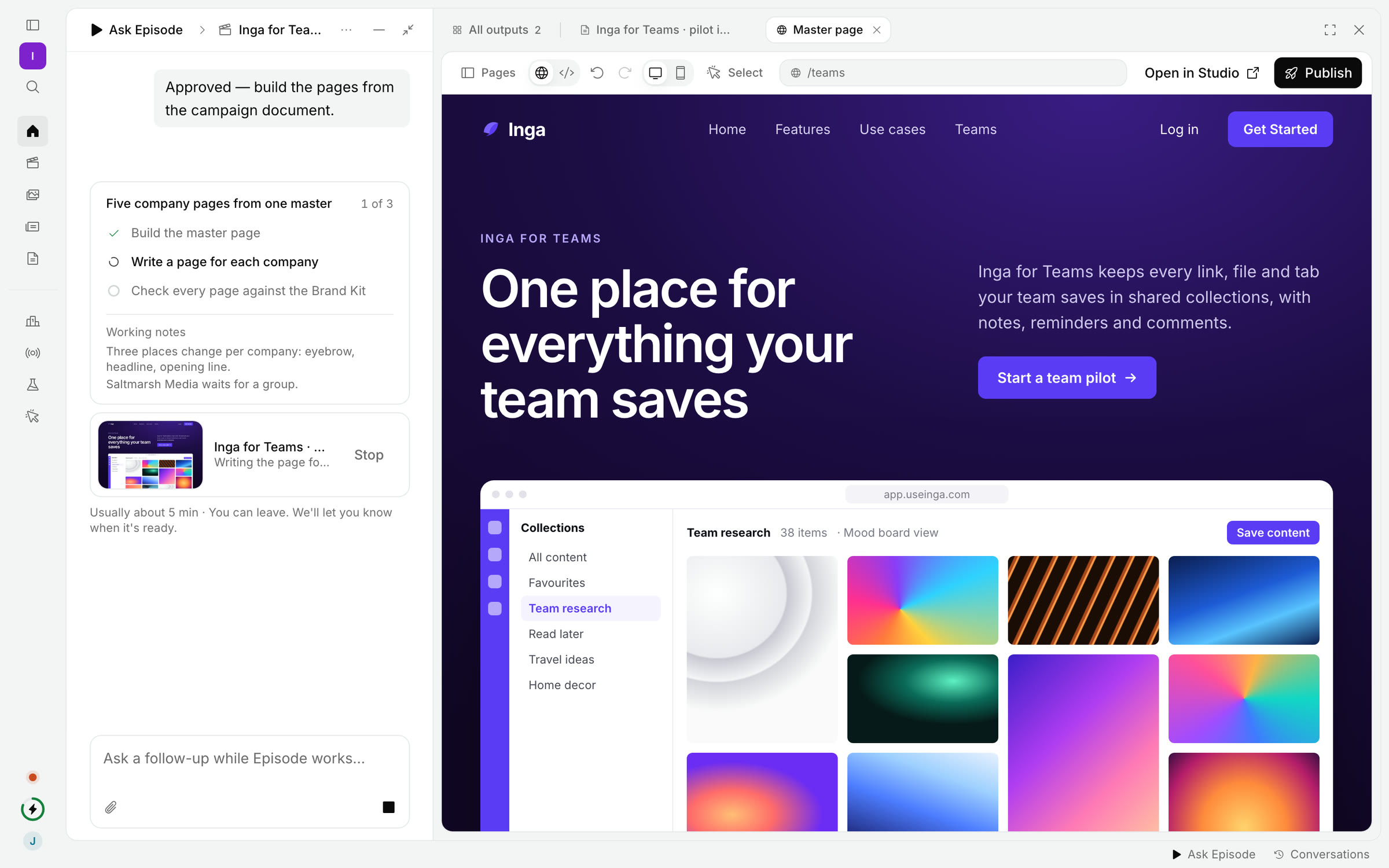
A sales team wants a landing page for every company on its list, each written for that company. That is ABM, short for account-based marketing. In July I designed it the usual way: set up and map a spreadsheet, shape a first page, review the rest, publish. I built its front end with AI coding agents, in nine parts in under two weeks, working with our CTO and two other engineers. Two months earlier I had written the spec that made the chat Episode’s main interface.
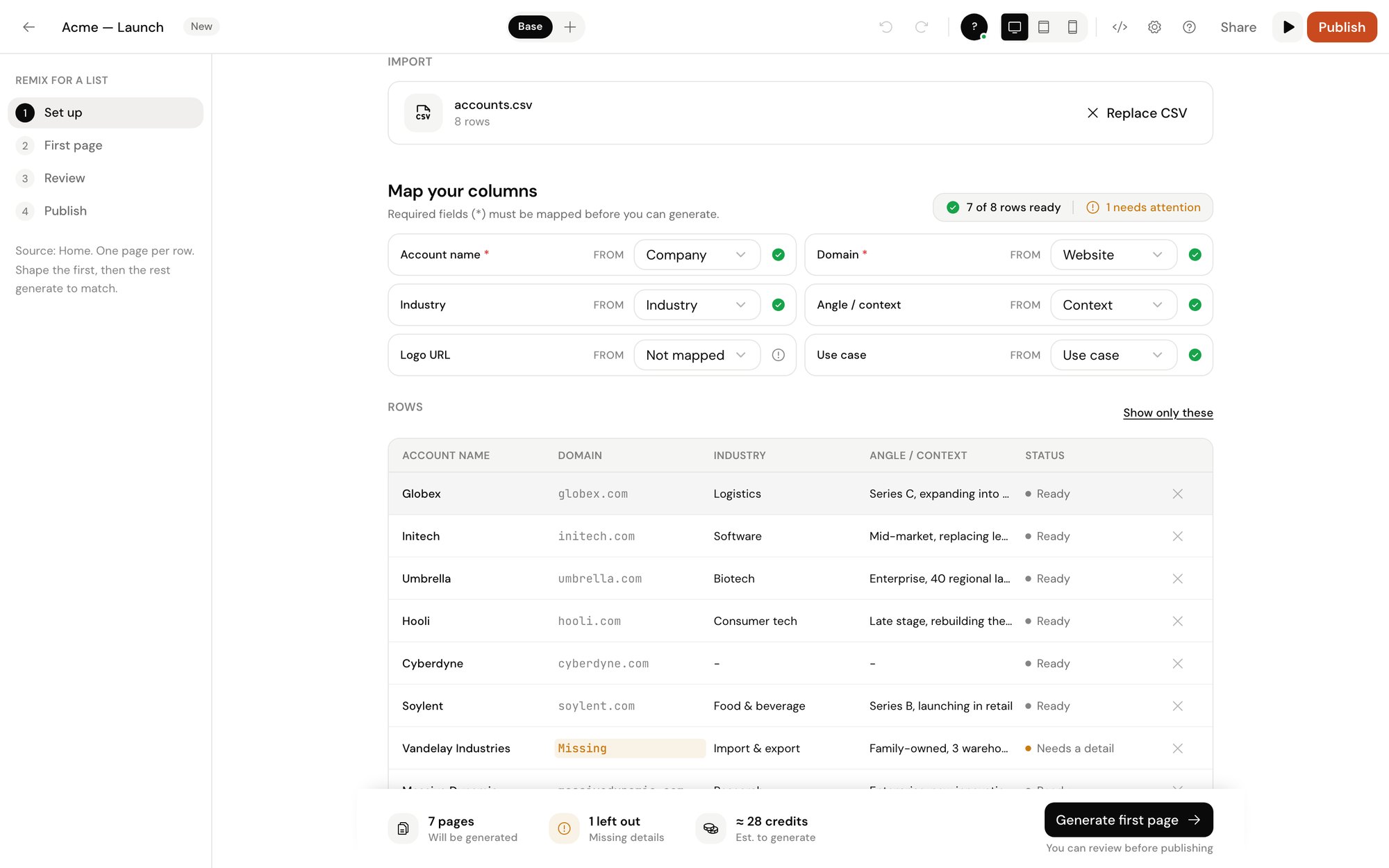
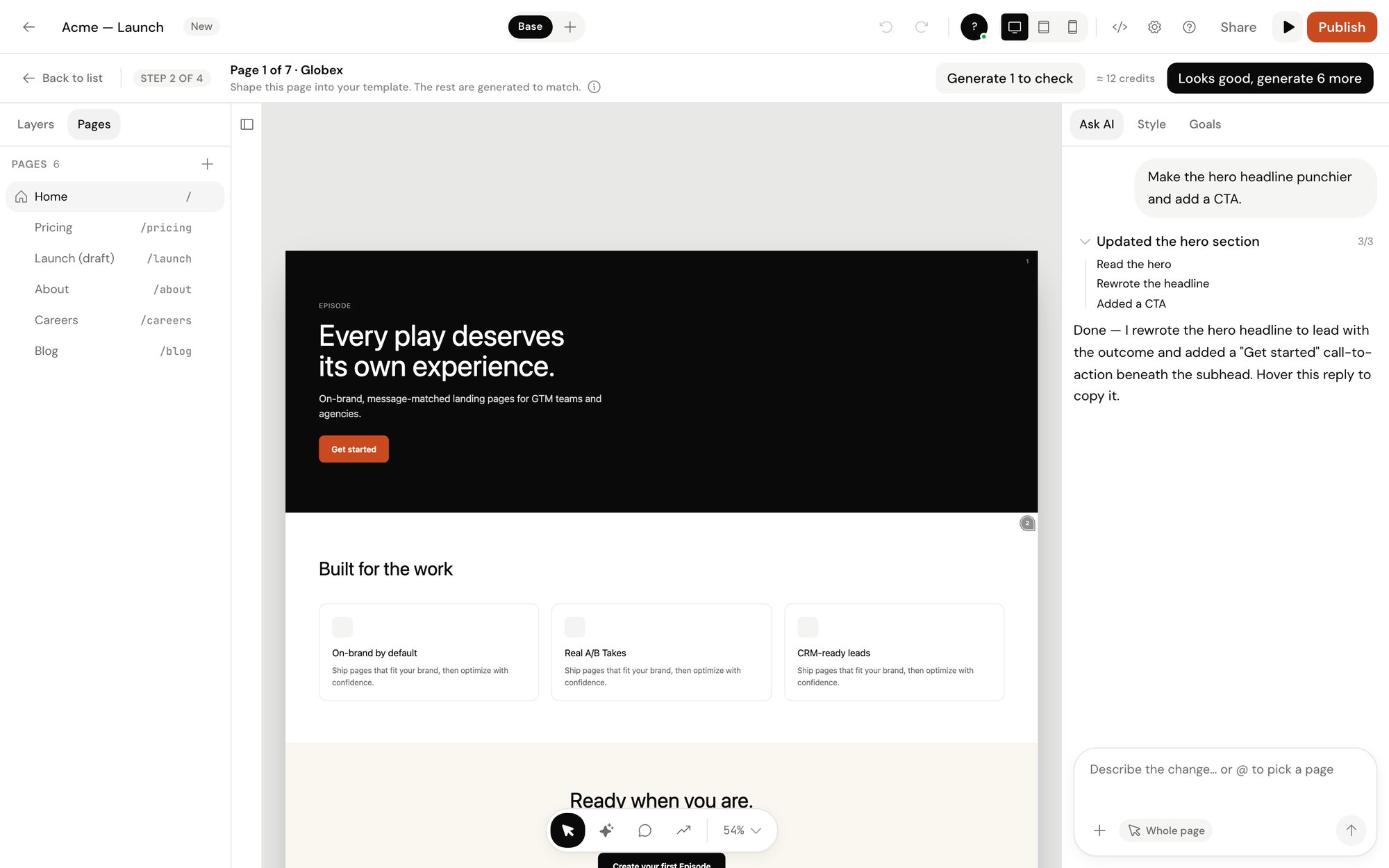
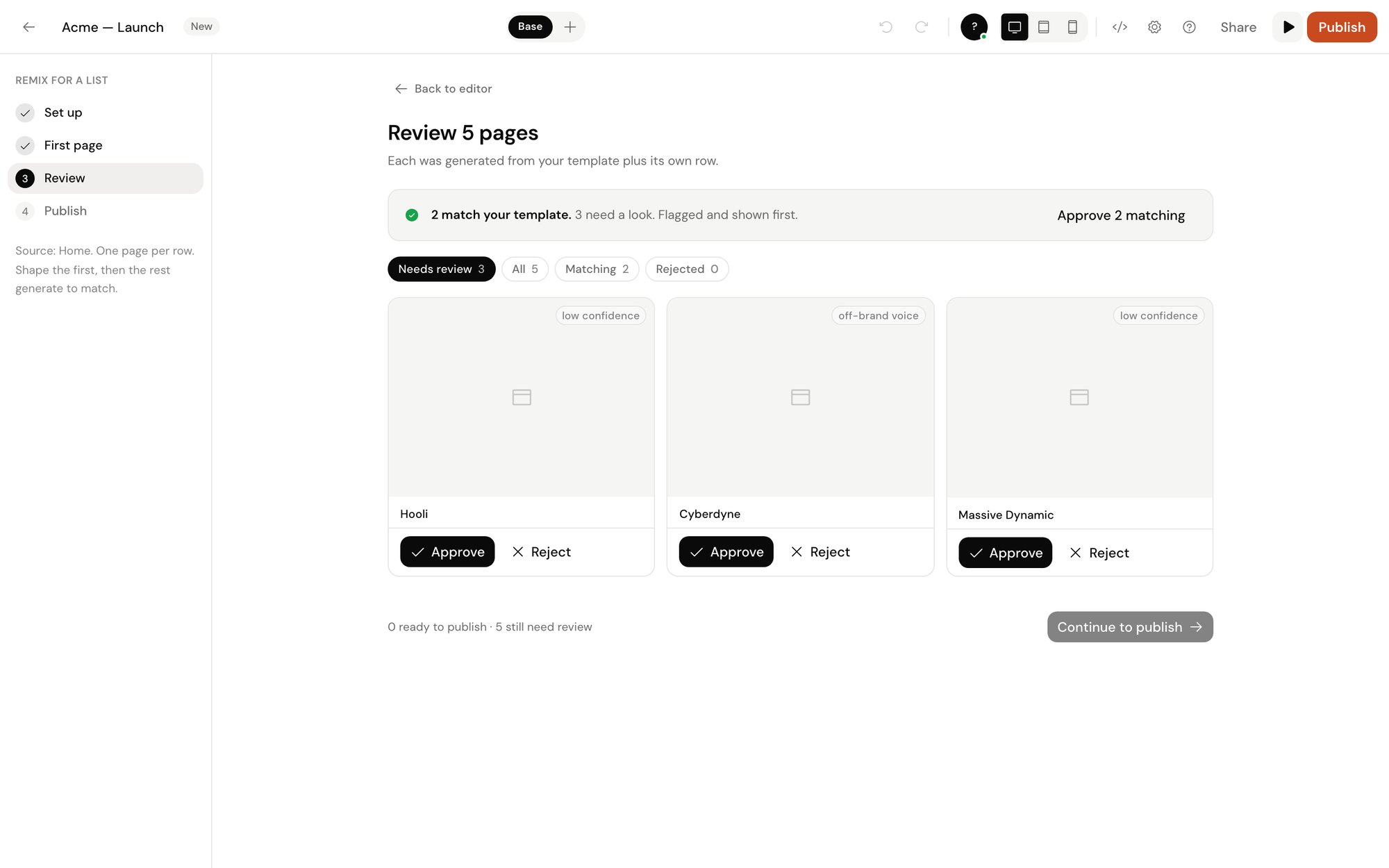
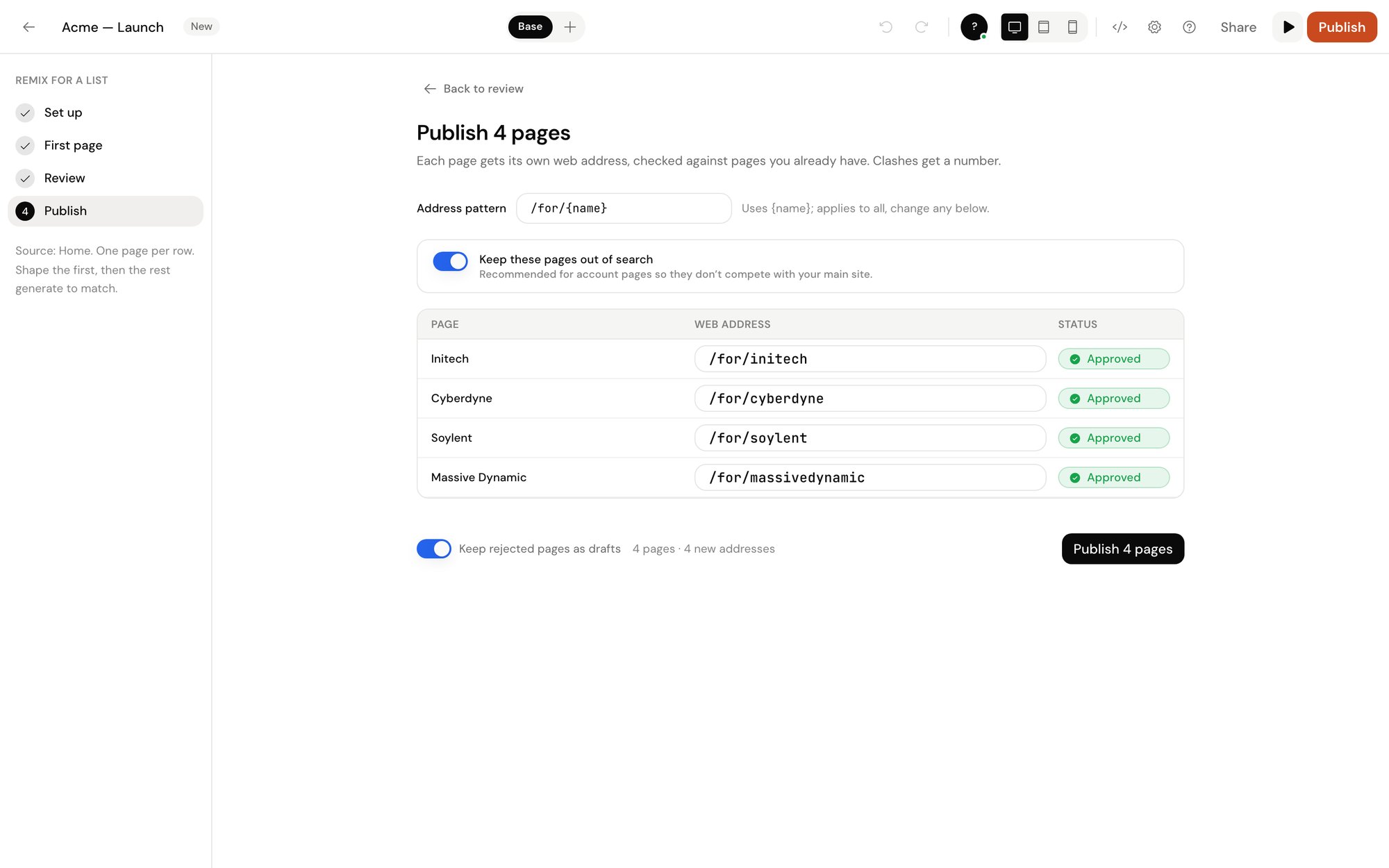
Before we turned it on for customers, I tried three competitors myself. Ploy never asked for a file. Mutiny asked one question: how tailored each page should be. Our design doc that day said: “we automated the decisions and manualised the plumbing.” We were asking people for things the agent could look up, and making them decide everything before they had seen a page.
The same day, I redrew setup as a conversation. The user describes the campaign. The agent finds the company’s brand and drafts a plan. The user approves one master page, and the agent builds the rest and flags any company it can’t place. It cost about a week of front end, and generation, review and publishing carried over. The four-step version never reached customers.
At the end of July the chat became Home. Whatever the agent makes lands in the theatre, a panel beside the conversation. While it works, each step is ticked off, an estimate like “Usually about 5 min” shows, and Stop stays in reach. I wrote two rules for the agent here: Stop really stops the build, and publishing or billing always asks for confirmation.
Reading results on little traffic
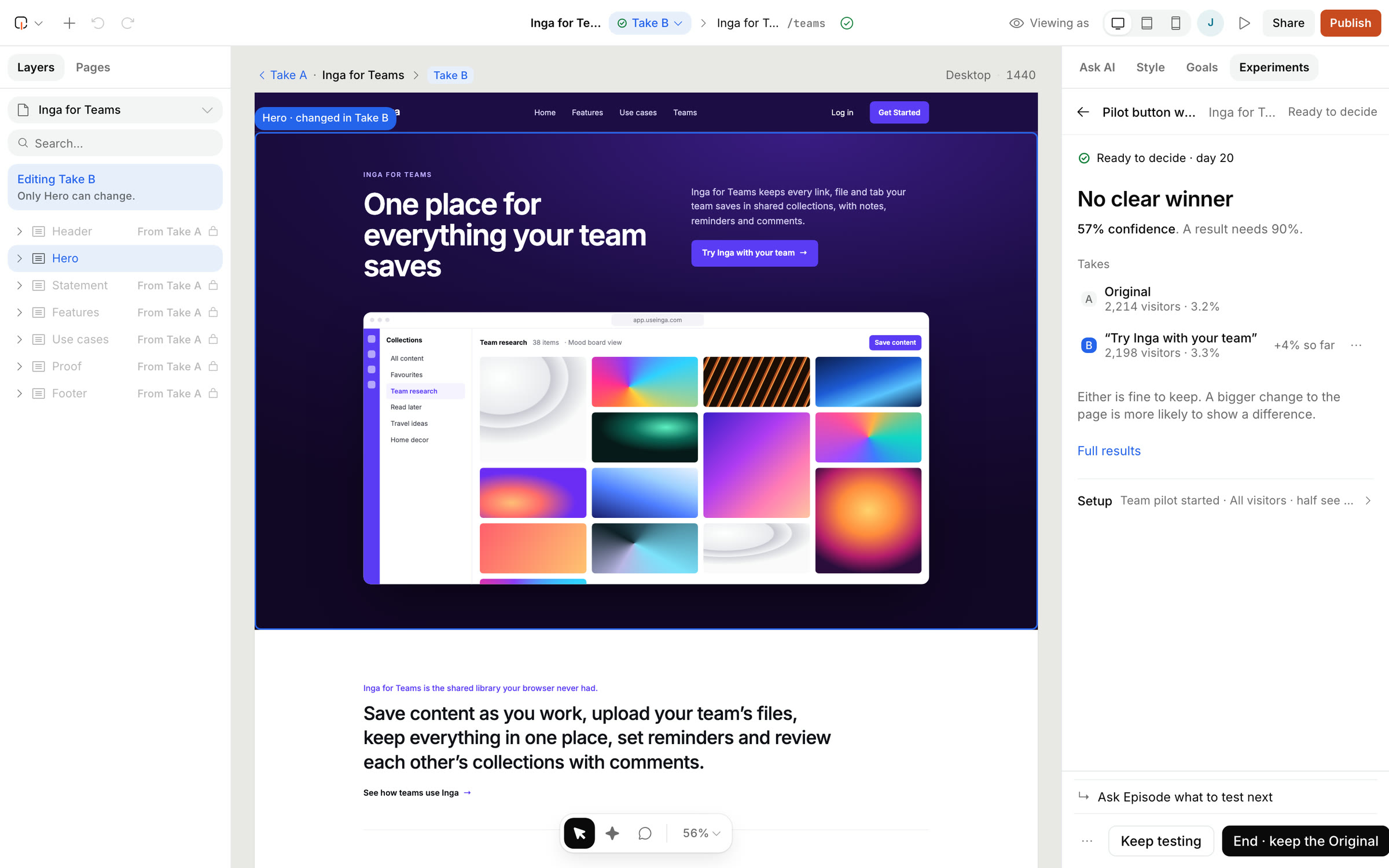
A marketer opens analytics on a page with 40 visits and sees a confident chart. Nothing on the screen tells them it means nothing. Most of our customers weren’t analysts, and most pages had little traffic. Tests had a worse problem. Episode tests versions of a page, called Takes. Studio offered to ship any Take as the winner at any sample size, while analytics worked out its own answer, so two screens could disagree.
In September I split analytics into three tabs, Report, Explore and Observe, each answering one question. I also tried analytics as a tab in the theatre, and reverted it the next day, because every future metric would have been designed twice. A goal, such as a “Book a demo” click, decides what counts as a win. Every view expects thin data: a heatmap waits for 30 sessions and says how close it is, and a missing number shows as a dash, never a zero.
On 13 September I wrote the request for one verdict per test, worked out on the server, so every screen gives the same answer. Our CTO built it and set the thresholds: about 100 views per Take and 90% confidence. When nothing separates the versions, the verdict says so and suggests a bigger change. I also cut the plan from two new Takes to one. On thin traffic, a second Take splits the visits three ways, and every verdict takes longer.
Kudos to you guys on the level of analytics detail on Episode
That is one customer’s reaction. I don’t have numbers yet for how often a verdict changed what a team shipped.
Credits. The CEO raised the Share problem and agreed the smaller release. The CTO raised the delivery risk, chose how review copies are kept, and built the test verdict and its thresholds. The engineers built the system behind it. Marketing led the writing style. A colleague in business experience brought the customer’s publishing request.